Roundexa Assistant
live AI help during your interview
A lightweight overlay that listens during your real interview and suggests answers as questions come in — personalized to your resume and background.
Sign In to DownloadFree to install · Pay only per question, from your Roundexa credits
Roundexa Assistant is a separate, optional tool. By downloading, you agree to use it at your own responsibility and in line with the rules of the interviews you attend.
Interviewer
What's your biggest strength?
You
I stay calm under pressure and break big problems into smaller, manageable steps…
A small, always-on-top overlay you can drag anywhere on screen.
Prepare. Perform. Review.
Roundexa Assistant isn't a separate tool — it's one stage of the same account.
Prepare
Practice with mock interviews
Run AI mock interviews and get feedback on your answers before the real thing.
Start a mock interview →Perform
Get live help in the real interview
Roundexa Assistant listens and suggests answers as questions come in.
Review
Track your progress
Your mock interview scores, trends and weak spots live on your dashboard.
View your dashboard →How it Works
Sign in to Roundexa
Your Roundexa account (and its credit balance) is what powers the app — create one first if you haven't.
Download & Install
Click "Download for Windows" below and open the file. If Windows shows a blue "protected your PC" screen, follow the 3 quick clicks shown below.
Add Your Context
Paste your resume or background into the Context box so answers sound like you.
Start Listening
Hit Start before your interview begins — the app transcribes the conversation live.
Get Instant Answers
As questions come in, Roundexa Assistant suggests a reply right in the overlay.
Windows shows a warning? That's normal.
Roundexa Assistant is a new app, so Windows SmartScreen hasn't seen it much yet and shows "Unknown publisher". It's safe to open. Do this once:
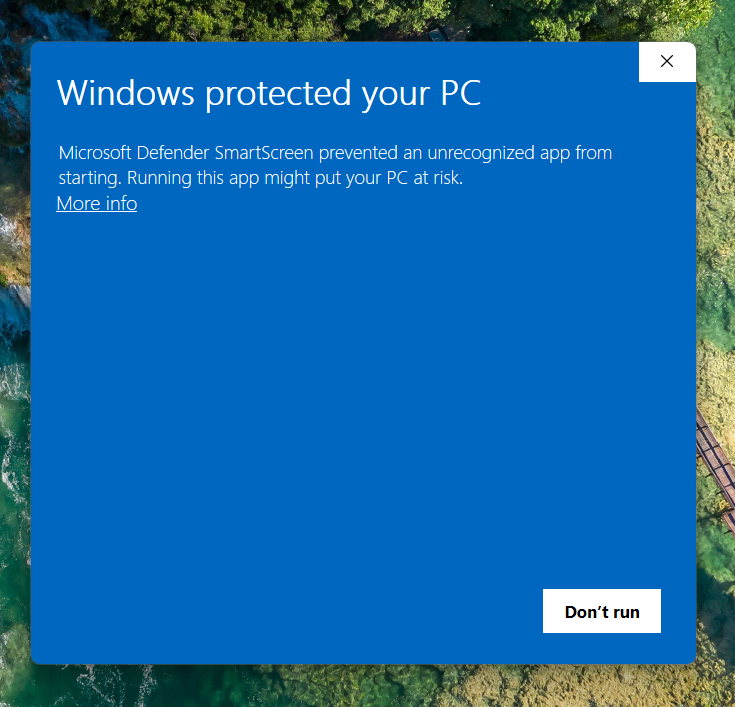
1Open the file. On "Windows protected your PC", click More info.
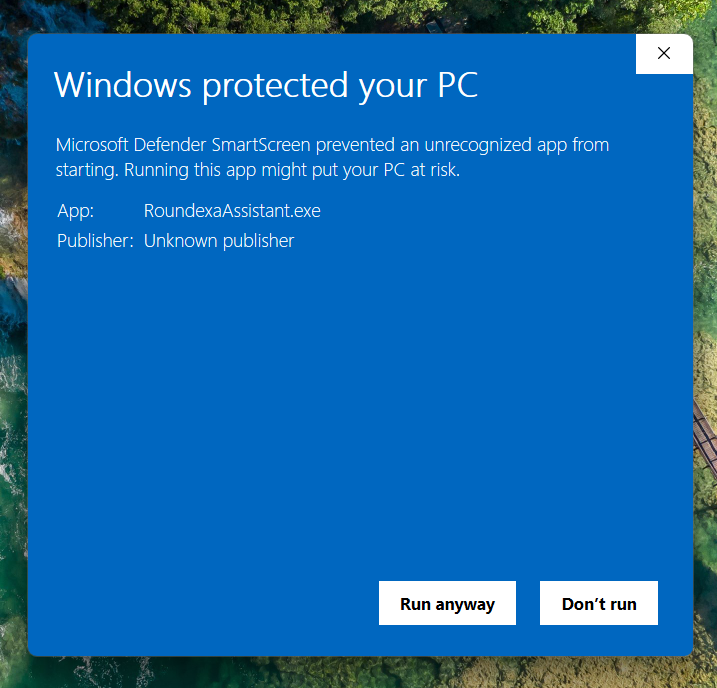
2Now click Run anyway.
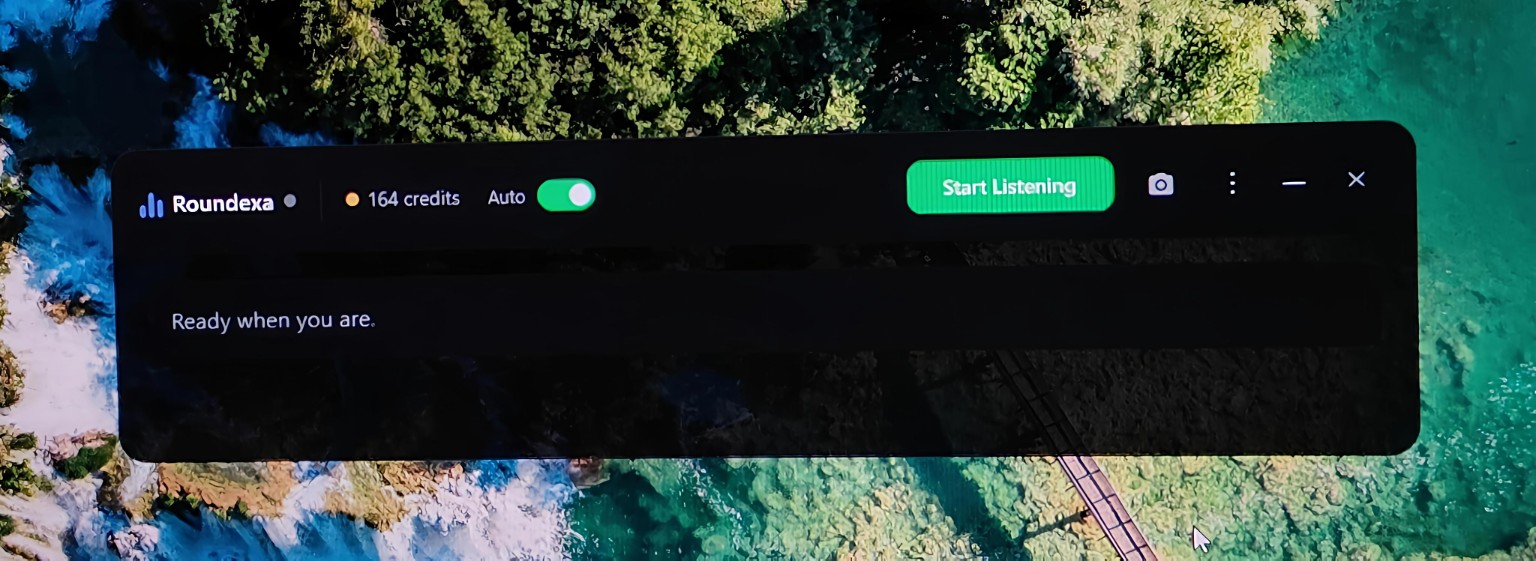
3Roundexa Assistant opens. Sign in and you're ready to go.
Roundexa Assistant is a separate, optional tool. By downloading, you agree to use it at your own responsibility and in line with the rules of the interviews you attend.
Need help? Contact us
Live Transcription
Streams the conversation to text in real time as it happens.
Screen Capture
Grab a screenshot for OCR when a question is on-screen, not spoken.
Personalized Answers
Suggestions are shaped by the resume/context you provide.
Pay-as-you-go
1 credit per question, 3 credits per screenshot — same pool as the rest of Roundexa.
Adjustable Answer Length
Switch between Very Short, Short, Medium, Detailed, or Key Points on the fly.
Draggable Overlay
Move it anywhere on screen and dial the opacity to whatever's comfortable.
Why Roundexa Assistant
Most AI interview copilots charge a flat subscription. Roundexa Assistant doesn't.
Pricing
Flat monthly subscription
Pricing
Pay only per question, from your existing credits
Commitment
Locked into a plan whether you use it or not
Commitment
No subscription, no lock-in — top up whenever
Account
A separate app with its own sign-up and billing
Account
Same account as your mock interviews & resume tools
Getting started
New sign-up, new payment method
Getting started
Already signed in if you use Roundexa
Frequently Asked Questions
What are the system requirements?+
Windows 10 or 11, a working microphone/system audio, and an internet connection. Nothing else to install.
Why does Windows say "Unknown publisher"?+
Roundexa Assistant is a new app and isn't code-signed yet, so Windows SmartScreen can't recognize it. Click More info, then Run anyway. The steps with screenshots are above the Download button.
What happens if I run out of credits mid-interview?+
The app tells you and pauses answer generation — transcription keeps working. Top up anytime from the Roundexa Assistant tab.
Is my interview data stored?+
Transcripts and the context you add are saved with your session for 30 days so you can review them, then automatically deleted.
Does it work for in-person interviews too?+
It's built for video calls using your computer's audio, so it isn't designed for in-person interviews.
Roundexa Assistant draws from the same credit pool as mock interviews and resume checks — no separate subscription. View credit plans →